

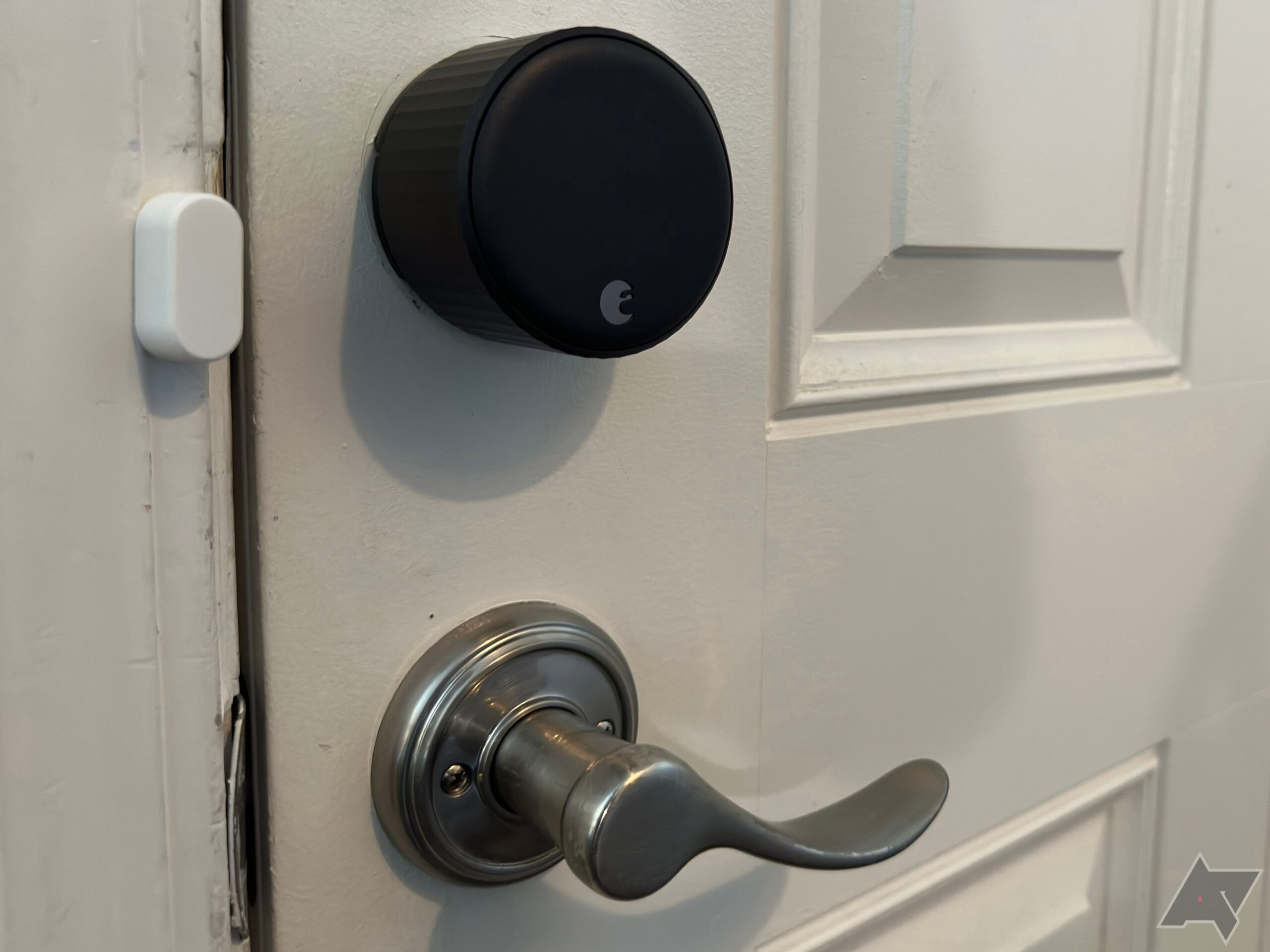
The worst part of August’s Wi-Fi Smart Lock (4th Generation) is that it reminded me that I have a crooked front door. So much so, that the device’s incredibly helpful locking and unlocking functionality, which you can access via a simple smartphone app or trigger on a timer, was less useful for me. But that’s the door’s fault; the Wi-Fi Smart Lock is as easy to install as it is to configure, and it’ll bring you extra security and convenience in less time than it takes to read this review. It’s not the most feature-packed lock, but it’s a solid addition to your smart home for a reasonable price.

August Wi-Fi Smart Lock (4th Generation)
We love how easy it is to install the August Wi-Fi Smart Lock on top of any standard deadbolt lock. In just a few minutes, you’ll have a door that can automatically lock and unlock itself, among other useful features.
- Brand
- August
- Connectivity
- Wi-Fi
- Integrations
- Alexa, Google Assistant, HomeKit
- Battery
- Two 3V CR123 lithium batteries
- Keypad
- Optional
- Hub Required
- No
- Dimensions
- 72 x 46 mm
- Super-simple setup
- Easy to integrate into your smarthome
- No-fuss app for configuring and controlling your lock
- Auto-Lock and -Unlock features work great
- Can assign permissions to guests by a schedule
- Doesn’t support 5GHz connectivity
- No alternate unlock method if you leave your keys and phone inside
- A bit too expensive when it’s not on sale
- Chonky, even with its size recently reduced
Price and availability
Do yourself a favor: Look for a sale

You can purchase the fourth-generation Wi-Fi Smart Lock directly from August for $200, its standard retail price. However, you’ll probably be able to find the device at your favorite online or local retailers for around $150 without much trouble. The price may vary depending on which of the lock’s two colors you select, black or silver, and you can also find a version of the smart lock that comes with a tiny, detached keypad for around $200-250, depending on the sales.
We reviewed the basic black smart lock, and we think it’s reasonable for around $150 or so. You can find smart locks with built-in keypads for slightly more, which would be our preference over having two separate devices to deal with.
Specifications
- Brand
- August
- Connectivity
- Wi-Fi
- Integrations
- Alexa, Google Assistant, HomeKit
- Battery
- Two 3V CR123 lithium batteries
- Keypad
- Optional
- Hub Required
- No
- Dimensions
- 72 x 46 mm
Setup and Installation
If you have a screwdriver, you’re good to go
The only minor annoyance of August’s Wi-Fi Smart Lock is that the company doesn’t give you much in the way of instructions when you first go to install it. You won’t find any useful print material in the box itself; instead, you’ll want to fire up August’s official app. Once you’ve created a primary account, it’ll walk you through everything you need to do to slap your smart lock onto a door’s deadbolt lock. (Or you can be like me and just give August’s two-minute YouTube video a quick look.)
As long as you can unscrew your deadbolt’s thumbturn – the part of the lock that faces inside, not out – then installing the Wi-Fi Smart Lock is a breeze. Pop off the thumbturn, which will expose the lock’s inner mechanisms. Save the screws, as you’ll immediately use those to attach the Wi-Fi Smart Lock’s mounting plate right where said thumbturn was. (You also get a separate cover, in case the hole in your door is larger than August’s mounting plate.)

Source: August
You’ll then attach one of four different mount adapters, slap the circular smart lock over the mounting plate, and secure the lock with its attached wings. Pop off the lock’s front cover with the press of a finger, pull the battery tab to activate the lock, and you’re good to go.
As one who gets pre-irritated at home improvement projects that have the potential to take forever, I was pleasantly surprised by just how easy it was to install the Wi-Fi Smart Lock. The smart lock only faces inside, which means there’s nothing to interact with on the front of the door save for your regular keyway, but it makes for an incredibly simple installation process.

Finally, you’ll stick or screw a little sensor to your door frame that will allow you to receive more detailed information about when your door is open, closed, or ajar. It’s August’s “DoorSense” technology, which is also part of the feature that lets the Smart Lock automatically lock whenever you shut the door, if you want. (You can also set it to automatically lock after a certain amount of time has elapsed, if it’s shut.)

You’ll spend a few more minutes in the app getting your smart lock registered correctly, calibrated, and set up with your home Wi-Fi network. The lock only connects via 2.4GHz, which isn’t that big of a deal unless you’re setting it up fairly far away from your Wi-Fi router (and/or you live in a 2.4GHz-saturated environment, like a condo complex, which might cause some fussiness). I’m the latter scenario, though, and I didn’t have any issues with responsiveness when interacting with the smart lock.
The only real hitch I encountered, which I teased earlier, is that my wonky front door doesn’t shut flush with its frame naturally. I have to force it ever-so-slightly, which is something I don’t usually notice when using a manual deadbolt, as I turn the lock hard enough so it catches without my having to give the door a gentle nudge. The Wi-Fi Smart Lock’s automatic deadbolt wouldn’t apply as much force as I do, which means the smart lock would frequently think that it was jammed and not, in fact, lock the door. If you have a wonky door, like me, know that you’ll probably have to fix it up before you can take full advantage of the Wi-Fi Smart Lock’s capabilities.
Design and hardware
Yes, this is actually a smaller August lock

Everything previously mentioned is all you get in the Wi-Fi Smart Lock’s box. Two CR123 batteries come pre-installed on the Lock and rated by August to last approximately three months. You’ll want to stock up on replacements, but the lock itself will still work manually if the batteries give out (as in, you won’t be locked out of your house as long as you have a key). If you’ve set up the door lock at the fringes of your 2.4GHz Wi-Fi network’s range, the lock’s battery life may suffer as a result of the worse connection.
At roughly 2.8 inches wide and 1.8 inches deep, the smart lock will likely look and feel much bulkier than your standard deadbolt housing and lever. It takes a little getting used to, aesthetically, but the lock’s many conveniences make up for its bulk. You open doors from the inside by turning the lock’s entire case, like a Nest thermostat; you open them from the outside using the lock’s app (or your regular key).
Features and app
Make sure to connect your smart lock to your smart home


There’s not a ton to do in August’s accompanying app, only because you’ll likely set up your lock once, fiddle with it a bit after a week or so of playing with its features, and then use the app’s first screen to lock and unlock your door over and over again.
That said, the app does have a number of features that are incredibly useful for a typical homeowner. I loved the ability to invite others into my home setup, perfect for family members or other loved ones you’d like to give access to your home. You can make them either owners (nope!) or guests of your setup, and restrict their access to schedules as needed (whether that’s recurring days and times, or a one-time use kind of a setup).
For my paranoia, I appreciated that it was easy to lock down the smart lock within the app. This restricts you from being able to mess with the lock via the app until you’re authenticated with a passcode or biometric setup – my iPhone’s built-in Face ID, in my case. Beyond that, the lock itself can also emit noise for locks and unlocks to give you extra peace of mind (in case you don’t hear the lock turning for whatever reason).


The real meat of the app, though, lies in its auto-lock and auto-unlock functionality. You have a number of options here, including setting a time for when the door should re-lock if it’s been unlocked but not open; having your door automatically lock as soon as you close it; and triggering an “auto-unlock” that occurs when you’re within a few feet of your door after being away (at least 200 meters away, that is).
Additionally, the app can notify you if the smart lock senses the door has been left slightly open for too long (a time period you specify). You can also set up a plethora of notifications that can tell you when a door is unlocked or locked manually (or by a specific user), or the door has automatically locked itself.
In short, you have way too many options to automate some of the (minor) annoyances of a door unlocking and locking, coupled with way too many ways to know if, or when, either action has occurred. It’s redundancies upon redundancies, and exactly what I like to see in a smart lock.
The Wi-Fi Smart Lock also has a useful Home Assistant integration, for the nerdier smart-home owners among you.
I had no trouble setting up the August Wi-Fi Smart Lock with Apple Home and Google Assistant, which made it even easier to mess with the door when I was too lazy to pull my phone out of my pocket. I especially appreciated that Google Home/Assistant requires you to set up a PIN, which you then have to input on your smartphone (or verbally) whenever you want to unlock the door. It’s just one extra layer of security that made me much more comfortable yelling at a speaker to let my friends in my house.
The Wi-Fi Smart Lock also has a useful Home Assistant integration, for the nerdier smart-home owners among you. And you can even use August’s website to log out of the app on all devices it’s been installed on, in case your primary smartphone is ever lost or stolen. That’s just great.
Competition
You can go cheaper, but it’ll lack polish

There are plenty of smart locks out there, all with differing configurations and options. What sets the August Wi-Fi Smart lock apart is that it’s just an attachment that goes on top of your existing hardware; it’s not replacing your deadbolt, which you may want to do if you’re not satisfied with its security. Beyond that, you can only interact with the smart lock via the app or phone. There’s no keypad, biometrics, or any other crafty method for entering your house if you lose said phone, the battery dies, or you’re just having some kind of a connection issue. Either the lock detects you’re nearby and opens up, you trigger it to do so via the app, or you go back your ol’ fashioned key in your regular lock.

Best smart locks in 2024
Upgrade your security with an easy-to-use smart lock
I’ve used both types of locks for years, and I tend to prefer those with a keypad and “you’re nearby” capabilities, just for ease of use, but not having physical hardware on the front of the door isn’t a huge deal. And, as I previously mentioned, it makes installing the lock a lot easier, which feels like a fair trade-off.
Should you buy it?
Your boring door will thank you

You can absolutely find cheaper locks that do much of what August’s Wi-Fi Smart Lock can do, but the consistency of their connections, sensors, or quality can vary. August’s lock is a single device that’s easy to install, requires no other hardware to communicate thanks to its built-in Wi-Fi connectivity, and doesn’t reveal that your door has a smart lock to anyone looking at it.
Its technology is sound, its notifications and locking mechanisms are useful, and it’s super-simple to mess with in a fuss-free application. And I love that the door lock can connect out to plenty of other smart-home platforms, for added convenience. If you can find the August Wi-Fi Smart Lock for $150, I think that’s a reasonable price for a high-quality smart lock.
August Wi-Fi Smart Lock (4th Generation)
We love how easy it is to install the August Wi-Fi Smart Lock on top of any standard deadbolt lock. In just a few minutes, you’ll have a door that can automatically lock and unlock itself, among other useful features.
